Suno is for someone who wants a song and does not have a band in the room. On the homepage you go to suno.com, describe the song you want, genre, mood, theme, or your own lyrics, and hit Create. You can try that without a credit card. The homepage offers up to 10 songs a day. Paid plans add the models, downloads, and commercial use the pricing page lists, and Premier adds Suno Studio, the browser workspace for arranging with MIDI and effects.
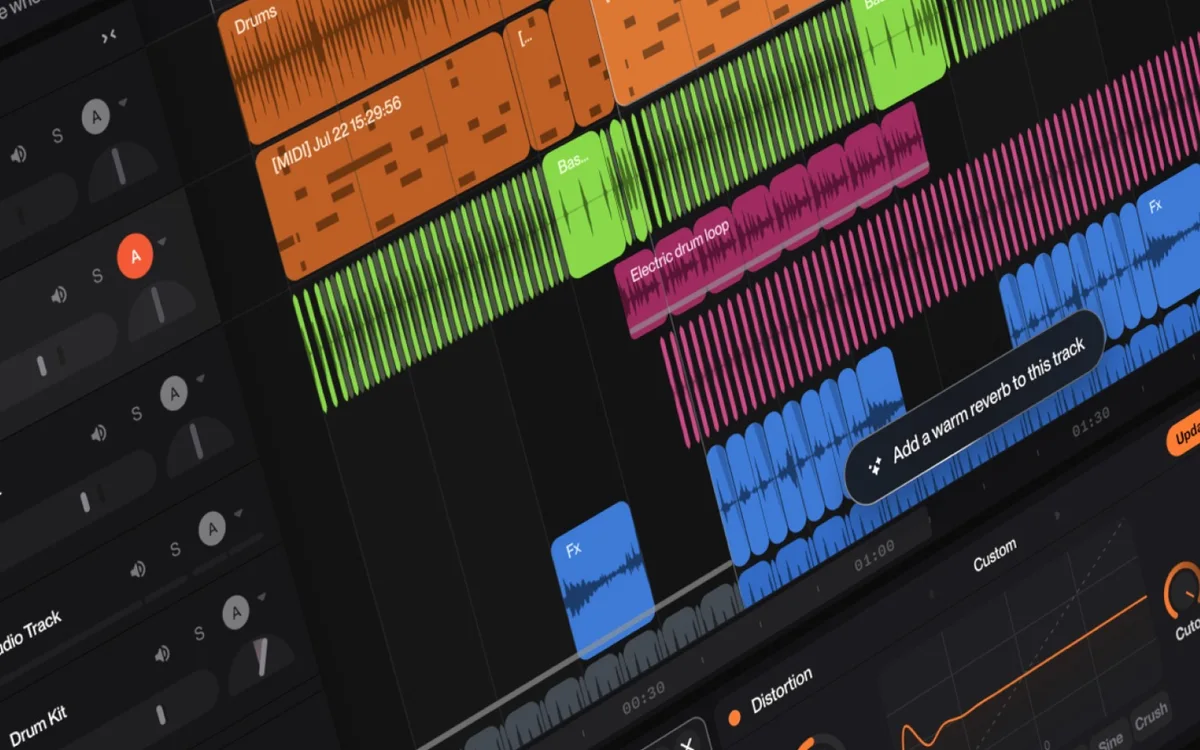
Official Studio image. The timeline, MIDI, and effect control are how you arrange a song after it exists, rather than only prompting a new one. Source ↗
Pricing model
Freemium
Main input
A genre, mood, theme, or lyric
Output
A generated song, stems, or a Studio arrangement
Access
Browser, with Studio on the Premier plan
Is Suno right for you?
Use Suno when the starting point is an idea for a song rather than a finished multitrack session. A description or a lyric sheet is enough for a first generation. Listen before you generate siblings of the same idea. If the song is close, change the lyric or the style instead of hoping a tenth generation fixes the chorus. Stems, once your plan includes them, split a song into parts such as vocals and drums so you can move those parts into another editor. Studio is the in-browser arranger, with a timeline and mix controls, and the pricing page lists it on Premier along with MIDI and effects. Publishing or placing the song in client work needs the commercial rights the paid cards list. The free card says those rights are not included.
A good fit for
A first recording of a melody, a mood, or a lyric you already wrote.
Splitting a finished generation into stems when the plan includes that tool.
Arranging in Studio when you need a timeline, MIDI, and effects rather than another full generation.
Know the trade-offs
The homepage offers up to 10 songs a day. The unpaid plan lists 50 credits per day. One number is not a conversion of the other.
Subscription credits do not carry over from day to day or month to month. Bought top-up credits do not expire, and they need an active subscription to use.
Commercial use and Studio are listed on paid plans. The free card lists neither commercial rights nor stem separation.
From a description to an arrangement
Start from a description or a lyric
Creation on the homepage is a short instruction. You name a genre, a mood, a theme, or you paste lyrics you wrote, and you create. A lyric you care about should go in as the lyric, not as a hint buried under adjectives, or the chorus will drift. If you only have a feeling, say the feeling and the instrumentation and accept that the words will be the model’s. Generate two takes of the same idea and keep the one you would play again.
You can try this without a credit card. The homepage offers up to 10 songs a day. The unpaid plan lists 50 credits per day, standard features, an upload limit, a shared queue, and no monthly downloads. Compare a few songs you would actually play again. Commercial use and stem separation come with paid plans, and they are not required to hear whether the chorus works.
Stems break a song into separate musical parts, vocals, drums, bass, guitar, keys, and the rest, so you can work on one part without reprinting the whole mix. The help center describes that split as time-aligned pieces you can carry into a digital audio workstation you already use. That is the path when the vocal is right and the drums are not, or when a video editor wants the vocal alone.
The free pricing card says stem separation is not included. Pro lists two stem types, Auto and Split from mix. So the feature is real, and it is not on the unpaid plan. Pull stems after you have chosen the song, not after every discarded generation. If a stem smears into the neighboring part, the generation was not clean enough to separate, and another lyric pass will do more than another split.
Official Studio image. The timeline, MIDI, and effect control are how you arrange a song after it exists, rather than only prompting a new one. Source
Arrange in Studio
Suno Studio is a browser workspace for arranging, editing, and mixing a song until it is the one you meant. The homepage calls it a generative audio workstation. The Premier card is more specific: MIDI, effects, automation, and plugins you design. The product image shows that surface, a timeline with MIDI and a reverb-style control, which is how you shape a part you already have instead of describing the entire song again.
Studio is listed on Premier, not on the free card and not on the Pro card’s feature list. If you are still choosing among generations, you do not need the timeline yet. Open it when the song is the right song and the work left is arrangement: moving a section, riding a level, exporting MIDI to another tool. Persona voices and early access to new features are the other Premier extras on that same card. They are not required to hear a first chorus.
Write one sentence for the genre and the mood, or paste a chorus you already like. Create a pair of versions. Listen to both all the way through before you change anything. Keep the take whose chorus you remember a minute later, and note what you would rewrite in the verse.
These steps suggest a writing session, not an arrangement session and not a stem export. Stop at a short list. The homepage’s daily song offer and the pricing card’s daily credits are both real statements. Neither one tells you to generate until the counter hits zero.
Pull vocals and drums out of a keeper
Once a generation is the one you will finish, split it if your plan includes stems. Ask for the vocal and the drums as separate parts and drop them into the editor you use for the video or the mix. Mute one and listen for leftover bleed from the other.
This is a finishing step. It is not how you discover the song. The free card excludes stem separation, so if the control is missing you are on the plan that says so, and the next decision is whether this song is worth a plan that includes the split. Do not approximate stems by generating the vocal as a brand-new song. That is a different performance.
Arrange a keeper in Studio
Open Studio when Premier is the plan you are on and the song only needs arrangement. Use the timeline to move a section, the MIDI view if you want the notes in another tool, and an effect such as the reverb control when the vocal is too dry or too far away. Export or bounce the arranged version rather than generating a replacement.
If you do not have Studio, stay with the generated file and a stem export on a plan that includes stems. These steps suggest arrangement of a song you have chosen. They are a poor way to brainstorm, because the timeline rewards a decision you have already made.
How to get started with Suno
1
Say the song in one prompt
Genre, mood, theme, or your own lyrics. Put a real lyric in the lyric field if the words matter.
2
Listen to two takes
Keep the chorus you can remember. Change the lyric or the style before you generate a stack of near-duplicates.
3
Split or arrange only the keeper
Stems if the plan includes them. Studio, with MIDI and effects, if you are on Premier and the song is already the right song.
4
Check the rights before you publish
The free card has no commercial rights. Paid plans list commercial use. Read that line before a client video or a release.
The homepage says Suno lets you create up to 10 songs a day with no credit card. The pricing page’s unpaid plan, which it calls a starter plan, is $0 a month, with access to free models, 50 credits per day, standard features, uploads up to 8 minutes, a shared queue, no monthly song downloads, no commercial rights, no add-on credit purchases, and no stem separation. The Pro plan shows $8 /month when billed yearly, with a note that yearly billing saves $24 and it includes the best models, 2,500 credits per month, 20 song downloads, commercial use, and two stem types. The Premier plan shows $24 /month when billed yearly, saving $72 with 10,000 credits per month, 60 downloads, and access to Suno Studio including MIDI, effects, automation, and plugins. Credits included in subscriptions do not carry over from day to day or month to month.
Free
Hearing whether a description becomes a song you like, without a card.
$0 / month
50 credits per day
Up to 10 songs a day on the homepage offer
No commercial rights and no stem separation on the pricing card
Pro
Regular songs you may publish or use in a video.
Pro plan shows $8 /month
Yearly billing, 2,500 credits per month
Commercial use rights
Two stem separation types and 20 downloads a month
Premier
Arrangement in Studio, with MIDI and effects, on top of a larger credit budget.
Premier plan shows $24 /month
Yearly billing, 10,000 credits per month
Suno Studio with MIDI, effects, and automation
60 song downloads a month
Up to 10 songs a day and 50 credits per day are both published. Neither figure converts into the other. Purchased top-up credits do not expire, but they require an active subscription to use. Taxes are calculated at checkout. The Pro and Premier monthly figures are shown with yearly billing. Confirm the current charge before you subscribe.
ElevenLabs is built around speech, dubbing, and voice agents, and it can also generate music. Suno is the fit when the piece should be a song with lyrics, sections, and an arrangement.
You are cutting spoken video or a podcast, not writing a song.
Descript edits recordings by their transcript and can clean up speech. Suno generates the song. Use Descript when the picture and the talk track already exist.
Runway generates and edits video. Suno does not stage a shot. If the video is done and it needs a track, start in Suno. If the track is done and the shot is missing, start in Runway.
Suno: common questions
Can I make a song without paying?
Yes. The homepage offers up to 10 songs a day and no credit card. The pricing card lists 50 credits per day on the unpaid plan, without commercial rights or stem separation. Read the screen you are checking out from.
Subscription credits do not carry over from day to day or month to month. Top-up credits you purchase do not expire, and they require an active subscription to use.
Premier. That card lists Suno Studio with MIDI, effects, automation, and plugins, and the Premier plan shows $24 /month on yearly billing. Pro lists models, credits, downloads, commercial rights, and stems, not Studio.
The free card says no commercial rights. Pro and Premier list commercial use. The homepage also says songs you create as a paid subscriber are yours to keep, including as background in a video, subject to the terms.
They split a song into parts such as vocals and drums so you can edit one part, or move it into another audio tool. The free card does not include the split. Pro lists two stem types.
NavHunt did not run Suno. Song creation, Studio, and commercial-rights wording come from the public homepage. Credit and plan wording come from the public pricing page, reviewed on 6 October 2026. Stem wording comes from the public help center. The picture is the official Studio image.