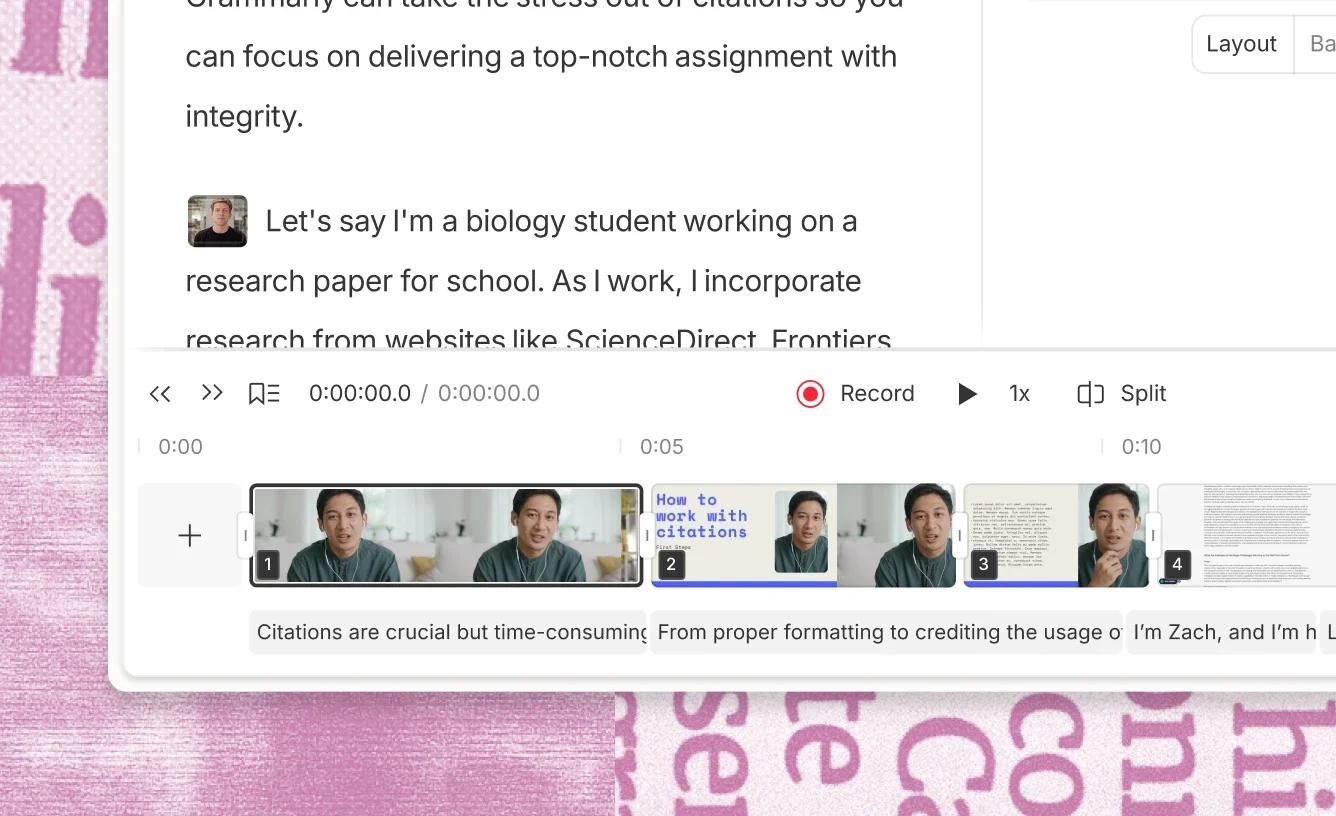
Descript is for someone who has a recording and would rather edit the words than drag clips on a timeline. The homepage states the method directly: edit your words to edit your video. You copy, paste, and drag in the transcript. Filler words and retakes can come out in one action, and the timeline is still there when you need it. Transcription is automatic. From that text you add captions, clean the sound, or hand a pass to Underlord, the AI co-editor that can create a video or edit yours under your direction. A free account is the way to try text-based editing. Paid plans are for longer media and the fuller set of AI tools.
Official image of the transcript beside the timeline. Removing words removes the matching picture and sound. Source ↗
Pricing model
Freemium
Main input
A recording, a screen recording, or a script
Output
An edited video or audio piece, plus a transcript and captions
Access
Web editor, with free text-based editing to start
Is Descript right for you?
Use Descript when the recording is the source and the cut is mostly about what was said. Delete a sentence in the transcript and the picture and sound for that sentence go with it, which is what the product image shows: the words on one side, the timeline on the other. That is faster than a traditional trim for a talking-head video, a lesson, or a podcast, and it is the wrong tool when the edit is really about B-roll timing that was never spoken. Studio Sound, eye-contact correction, and filler-word removal are the cleanup passes after the structure is right. Underlord is for a draft cut or a revision you still direct. Screen recording and rooms for remote guests are how material gets into the project. Read the plan when you outgrow the free media allowance, and pay the amount checkout shows.
A good fit for
Cutting a talking-head video, a lesson, or a podcast by deleting words.
Removing filler and retakes, then adding captions from the same transcript.
A rough cut from Underlord that you still review against the recording.
Know the trade-offs
Deleting a word deletes the picture and sound tied to that word. Read the sentence before you delete a clause you meant to keep.
Underlord works under your direction. A generated cut still needs you to watch it.
Each paid card shows two dollar figures beside per person / month. Pay the amount checkout shows for the billing period you select.
Transcript edits, cleanup, and a co-editor
Official image of the transcript beside the timeline. Removing words removes the matching picture and sound. Source
Cut the video by cutting the transcript
You start with a recording. Descript transcribes it, and the transcript sits where a document would. Edit your words to edit your video. Delete a false start and that stretch of picture and sound leaves with the words. Copy a sentence to move it. The timeline remains for a trim that is about frames rather than phrases, so you are not locked out of ordinary editing. The product image is this layout, words beside the timeline, which is how you see that a deleted clause took the matching frames with it.
Filler-word removal and retake removal are the bulk version of the same idea. They find the ums and the abandoned takes so you are not hunting each one. Use them after you have listened once, because a filler you meant as a beat is still a word the tool can cut. Captions come from the same transcript, which is why a spelling fix in the text should happen before you export subtitles. Translation and show notes are later exports of that cleaned text, not a substitute for the cut.
Clean sound and picture after the structure is right
The refine pass is a set of specific repairs. Studio Sound reduces a noisy room. Eye Contact adjusts where you appear to look. Green screen, lighting, and jump-cut smoothing are the picture versions of the same idea: one problem, one control. Regenerate speech can replace a flubbed line with a synthetic read, and the voice tools include a clone or a stock voice. Use regeneration when re-recording the line is the thing you are trying to avoid, and listen to it against the lines you actually said.
Do this after the transcript cut. Polishing a sentence you later delete wastes the pass. A screen recording, listed as its own feature, is how a product demo gets into the project without a camera. Rooms are how a remote guest gets into the same project. Both feed the same transcript. They are not extra editors with a different method.
Underlord is the AI co-editor. The video-editing page says that under your direction it can create a video or edit yours, and that text-based editing is what makes the cut understandable while Underlord makes a pass faster. You still decide the story. Ask for a tighter cut of a section, or for a sequence built from a script, then watch the result with the sound on. If it dropped a step the viewer needs, put the words back.
That is a different job from deleting one false start yourself. Use the transcript when you know the sentence that should go. Use Underlord when you want a proposal for a section and you will accept or reject it. Templates and stock media, on the plans that include them, are ways to start a layout. They do not pick the sentences. Export captions and the finished file only after the words and the picture agree.
Import the recording and wait for the transcript. Delete the warm-up and the repeated explanation. Move the sentence that states the point to where a viewer needs it. Play the result once with the picture, because a cut that reads well can still jump the frame awkwardly.
These steps suggest a transcript edit. Leave Studio Sound and eye contact until the structure is done. If a sentence was important and you deleted it, the words are the place to notice, before you export.
Remove filler and publish captions
Run filler-word removal on a podcast or an interview, then skim the transcript for a cut that removed a word you wanted. Fix names and terms in the text. Turn on captions from that corrected transcript so the subtitles match what you kept.
This is a cleanup, not a rewrite of the story. It is also not a screen recording. If the audio is the main problem, Studio Sound is the next control, after the words are the words you mean to publish.
Record a product demo and cut the hesitation
Screen-record the click-through once, including the mistakes. Transcribe it. Delete the hesitation and the step you undid, and keep the click that shows the result. Ask Underlord for a shorter version only if the demo is still too long after that pass, and compare its cut with the steps a new user must see.
These steps suggest a demo, which is a different recording from a podcast and a different edit from a cinematic scene. The transcript is still the map. Watch the cursor in the picture so a deleted sentence did not also delete the only frame that showed the button.
How to get started with Descript
1
Bring the recording in
Import a file, record the screen, or record a remote guest. Let the transcript finish before you cut.
2
Edit the words
Delete false starts and move the sentence that carries the point. The picture and sound follow the words.
3
Clean up what remains
Remove leftover filler, run Studio Sound if the room is noisy, and correct captions in the transcript.
4
Watch it once
Play picture and sound together. Restore any step the cut removed. Export after that viewing, not before.
Descript pricing starts free, with paid plans from $16/month. The free plan is $0 and includes text-based editing and give our AI tools a spin. The Hobbyist card reads Hobbyist $ 16 $ 24 per person / month and includes 1 person. The Creator card reads Creator $ 24 $ 35 per person / month, with room to scale to a team of 3 billed separately. The Business card reads Business $ 50 $ 65 per person / month, with room to scale to a team of 5 billed separately. Both figures on each card sit next to per person / month. Enterprise is a custom tier for teams with more video than editors. Checkout is where the amount for the billing period you select is confirmed.
Free
Learning the transcript edit on a short recording.
$0
Text-based editing to start
Text-based editing and give our AI tools a spin
Hobbyist
One person editing more than the free allowance.
Hobbyist $ 16 $ 24 per person
Per person / month on the card
1 person included
Paid plans from $16/month
Creator
A heavier edit, including 4K export without a watermark and fuller Underlord access.
Creator $ 24 $ 35 per person
Per person / month on the card
30 media hours and 800 AI credits on the published card
Scale to a team of 3, billed separately
Business
A group that needs the collaboration tier above Creator.
Business $ 50 $ 65 per person
Per person / month on the card
Scale to a team of 5, billed separately
Enterprise
A team whose video volume outruns the self-serve seats.
Custom
Contact sales
A custom tier for teams with more video than editors
Each self-serve paid card shows two dollar amounts and then per person / month. Checkout is where the billing period and the amount are confirmed. The charge is the one shown at checkout for the period you select. Media hours and AI credits are capped on the paid cards. Confirm those allowances on the pricing page before a long series.
Runway generates and edits video from prompts and stills. Descript starts from a recording and cuts it by the transcript. Use Runway when the footage does not exist yet.
ElevenLabs specializes in speech, dubbing, and voice agents. Descript can regenerate a line inside an edit, and it is the fit when the transcript and the picture have to stay in one timeline.
Grammarly works on the sentences you type. Descript is for the recording of someone saying those sentences. Write the script in Grammarly if you want, then record and cut it in Descript.
Descript: common questions
Can I try Descript without paying?
Yes. The free plan is $0 and includes text-based editing and give our AI tools a spin. Paid plans from $16/month are for more media and the fuller AI tools.
The video and audio tied to that word are cut too. That is the point of editing the transcript. Read the sentence before you delete a phrase you still need, and use the timeline if the trim is about frames instead.
The AI co-editor. Under your direction it can create a video or edit the one you have. Watch the pass it proposes. It does not replace the transcript when you already know which sentence should go.
The Hobbyist, Creator, and Business cards each show two dollar figures and then say per person / month. Pay whichever amount checkout shows for the billing period you select. The page states that paid plans start from $16/month.
NavHunt did not run Descript. Transcript editing and Underlord come from the public homepage and video-editing page. Plan wording comes from the public pricing page, reviewed on 6 October 2026. The picture shows the transcript beside the timeline.