Notion AI is for a team that already keeps its work in Notion and wants the assistant to use those pages instead of a separate chat. You can ask a question against a database the office maintains, write or rewrite a doc, and turn a meeting into notes that stay on the page. The homepage describes agents that take on busywork, meeting notes written up for you, and search across the knowledge you have stored. People still edit the page. Commenting and suggested edits are how a teammate marks a change without starting a second copy of the decision.
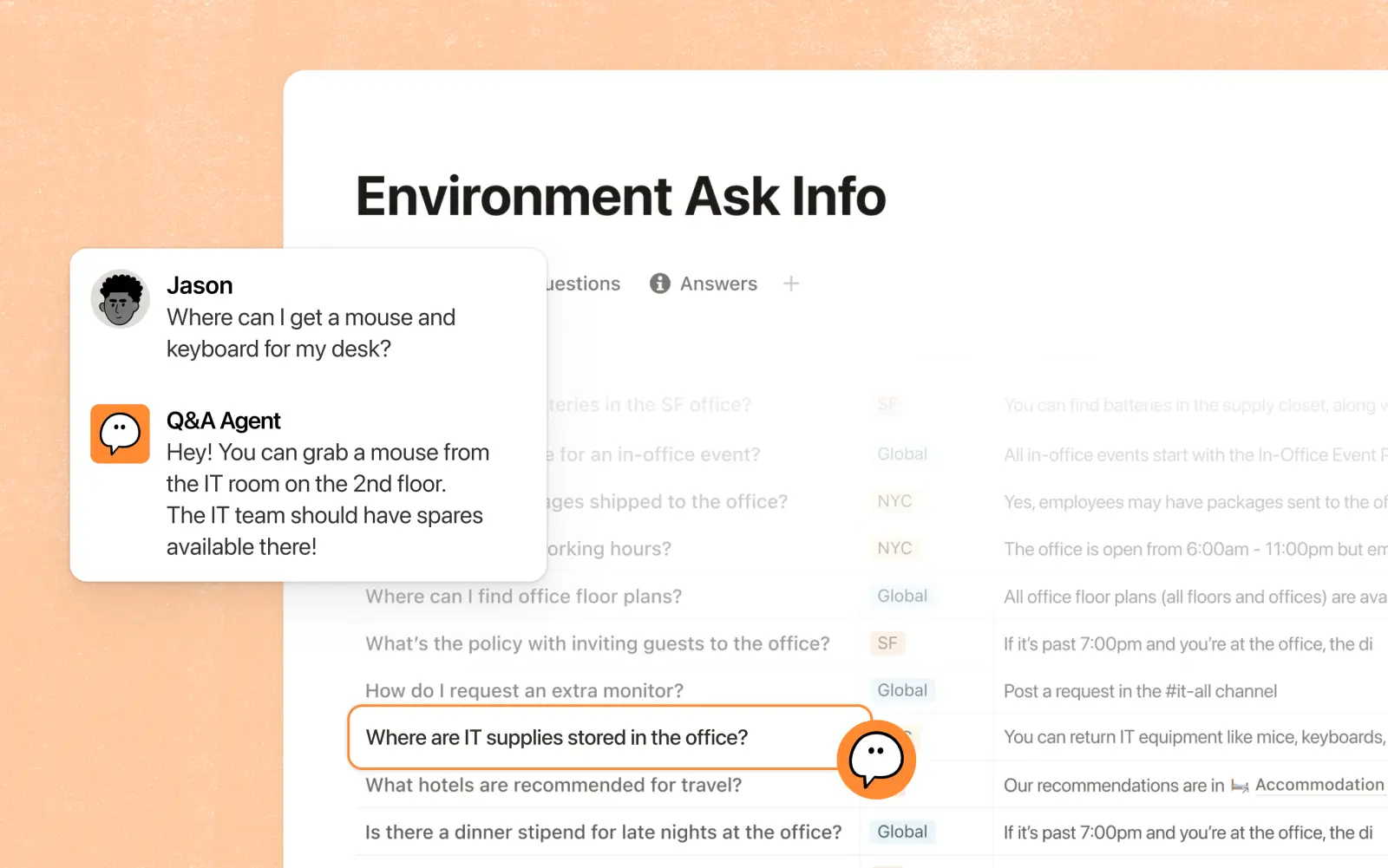
Official image of a Q&A agent. The question is answered from a database the workspace already has, which is the point of asking there instead of in a blank chat. Source ↗
Pricing model
Freemium
Main input
A page, a database, or notes from a meeting
Output
An answer, a revised doc, or meeting notes inside the workspace
Access
Notion workspace on the web and in the apps
Is Notion AI right for you?
Use Notion when the source of truth is a page or a database you are willing to maintain. A Q&A agent is useful when the answer is a row that already exists, such as where a piece of equipment is kept or which owner a project has. It is the wrong tool when the fact was never written down. Docs are still docs: someone can comment or suggest edits and pull the owner in with the @ key. Meeting notes are a different job again, a write-up of what was said rather than a search over old rows. Custom agents that run on their own spend Notion credits, which are not included just because the workspace has a paid seat. On Enterprise, Notion says its model providers use zero data retention for those workspaces.
A good fit for
Questions whose answers are already rows or pages in the workspace.
A requirements doc the team will comment on, instead of a side thread.
Meeting notes that should land on the same page as the project.
Know the trade-offs
An agent cannot cite a policy that nobody added to the workspace.
A paid seat does not by itself prepay the credits a custom agent spends.
Zero data retention with model providers is described for Enterprise plan workspaces, not as a switch on every free page.
Answers, docs, and meeting notes
Official image of a Q&A agent. The question is answered from a database the workspace already has, which is the point of asking there instead of in a blank chat. Source
Ask a database you already maintain
The useful version of workspace Q&A is not a general chat. You point at a database the team updates, ask in ordinary language, and the agent answers from those rows. The product image is that pattern: a question about where something is kept, answered from an office database rather than from the model’s memory. If the row is missing, the honest result is that the database does not have it. Add the row, then ask again.
That only works if someone owns the database. A stale row produces a confident wrong answer. Name the database in the question when the workspace has several that could match. Enterprise search, listed on the homepage beside the agents, is the broader version of the same idea: look across the knowledge you stored, then open the page the answer came from. If you cannot open that page, do not ship the answer.
Notion’s docs page is about writing together. You allow others to comment or suggest edits, and you type the @ key to get a person’s attention. Comments keep feedback on the page, including across time zones, so the decision does not fork into a chat that nobody files. Suggested edits are a proposal on the words themselves. A comment is the note beside them. Use a suggestion when the replacement sentence is the point. Use a comment when you are asking a question.
AI can draft or rewrite a section of that doc. The human pass is still the comment. A requirements page should end with one copy of the decision, the owner mentioned, and the outdated paragraph removed. Generating a second page and leaving the first one up is how teams lose the requirement. The docs surface is also where product, design, and engineering look at the same roadmap. The assistant does not replace that shared page.
AI Meeting Notes is listed as its own feature: a write-up of the meeting, produced in the workspace rather than in a separate recording tool. The job is to leave decisions, owners, and open questions on a page the project already uses. That is different from asking a database where a piece of equipment lives, and different from suggesting an edit on a spec. You are writing down what was just said so next week’s page is not a blank agenda.
Agents, the other homepage item, are for busywork you would otherwise do by hand: filing a result into a database, or preparing a routine update from pages that already exist. A custom agent that runs on a schedule is the version that can act when you are not in the doc. It still needs those source pages. Meeting notes stay a page the team can open. A scheduled agent is a later setup, not a different way of writing the notes.
A teammate asks where the spare equipment is, or which vendor a row names. Open the database that is supposed to know, and ask the Q&A agent in a full sentence. Read the row it used. If the row is empty or old, fix the row before you forward the answer.
These steps suggest a lookup, not a draft. Do not accept a plausible sentence when the database has no matching row. Add the fact, then ask once more so the next person hits the row instead of the chat.
Mark up a requirements page
Open the requirements doc. Where a sentence should change, suggest the edit on that sentence. Where you need the owner to decide, comment and type the @ key so they are pulled to that spot. Keep a single page. If the assistant drafted a paragraph, treat it as a suggestion you still have to accept.
This is an editing session. It does not answer an office-lookup question, and it does not replace the meeting notes. The outcome is one page whose comments are either resolved or explicitly still open.
File meeting notes onto the project page
After the meeting, put the notes on the project page rather than in a side document. Keep the decisions, the owners, and the questions that did not get answered. Ask the assistant to draft that write-up from the notes you took, then delete anything the room did not actually agree.
If the same write-up should happen every week without someone opening the page, that is a custom agent with its own setup. The notes from today are still a page the team can comment on Monday.
How to get started with Notion AI
1
Put the source where people can open it
A database row, a requirements page, or the project page. The assistant cannot cite a fact that was never added.
2
Ask or draft against that source
Name the database or the doc. Reject an answer that does not point at a row or a heading you can open.
3
Comment where a person must decide
Suggest the sentence, or comment and use the @ key for the owner. Leave one copy of the decision.
4
Separate a scheduled agent from a seat
A meeting note is a page anyone can comment on. A scheduled agent is a separate setup. Turn it on only when you know which page it will change.
The seat prices published on the pricing page are Free at $0 per member / month, Plus at $10 per member / month, and Business at $20 per member / month. Enterprise is the sales plan above Business. Custom agents are free to try, then $10 per 1,000 monthly Notion credits. Those credits are not the same thing as a seat. A Business seat does not describe itself as a prepaid block of agent runs. When using Notion AI, Enterprise plan workspaces are the ones for which Notion says its model providers use zero data retention.
Free
An individual organizing personal projects, with a trial of the AI features.
$0 per member / month
Per member
A trial of AI such as generating docs or autofilling databases
Plus
A small team working in the same pages.
$10 per member / month
Per member
The collaboration features included above the free workspace
Business
A growing team that wants the recommended paid workspace.
$20 per member / month
Per member
The Business seat
Custom agents still bill credits separately
Enterprise
An organization that needs the enterprise controls, including the model-provider retention terms.
Contact sales
Custom
Zero data retention with model providers on Enterprise workspaces
Seat price and agent credits are easy to mix up. The credit line is $10 per 1,000 monthly Notion credits after the trial. Confirm both the seat and any agent allowance at checkout. Tax and the annual or monthly toggle can change the charge.
The job is sentence-level writing help, wherever you type.
Grammarly marks grammar, tone, and rewrites in the text you are already writing, including outside a wiki. Notion AI is the fit when the text has to stay a page or a database row the team shares.
The source is a file or a repository, not a Notion page.
Claude works in chat, beside a live page, or in a repository through Claude Code. Notion AI is the fit when the answer should remain inside the workspace your team already updates.
Cursor edits a repository and shows a diff. Notion does not review code. Use Notion when the artifact is a doc, a database, or meeting notes, and Cursor when the artifact is the codebase.
Notion AI: common questions
Can I use Notion AI without a paid seat?
The Free plan is $0 per member / month and includes a trial of AI capabilities such as generating docs or autofilling databases. A paid seat starts with Plus. Custom agent credits are a further meter after the trial.
It can only use what the workspace contains. If the database has no row, add the row. Asking again in a blander way does not create the missing source.
No. Custom agents are free to try, then $10 per 1,000 monthly Notion credits. A Plus or Business seat is the workspace membership. Read both before a report runs on its own.
What is different about Enterprise and model data?
Notion says that when you use Notion AI, its model providers use zero data retention for Enterprise plan workspaces. That statement is tied to Enterprise, not to every seat below it.
NavHunt did not run Notion. The Q&A, docs, and meeting-notes descriptions come from Notion’s public homepage and docs page. Seat and credit wording comes from the public pricing page, reviewed on 6 October 2026. The picture is the official Q&A agent image.