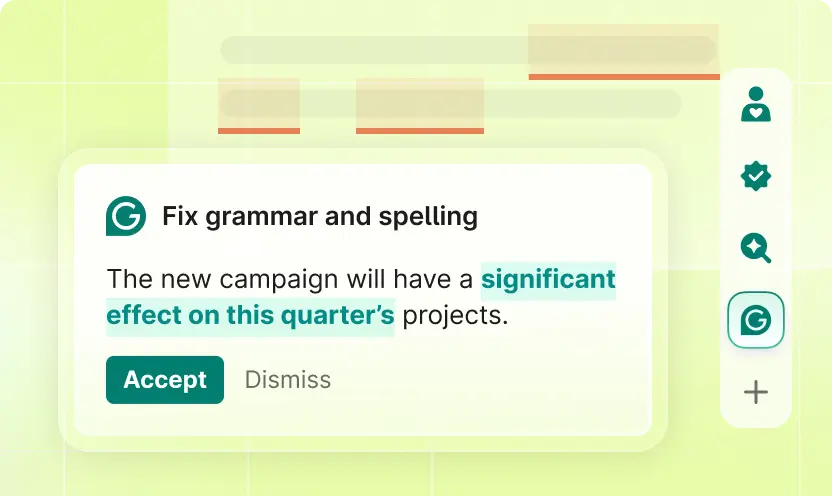
Grammarly is for someone who already has a draft and wants a second pass before sending it. It flags grammar and spelling, shows the tone of a sentence, and can rewrite that sentence when the plan includes rewrites. You stay in the browser, the desktop app, or Grammarly Docs, which the docs page describes as a writing surface where agents work beside you from outline to finished piece. The gesture that matters is small: a suggestion appears, and you accept it or dismiss it. The product image is that choice on a grammar and spelling fix. Nothing is applied because a highlight exists. You decide.
Official image of a grammar and spelling suggestion with Accept and Dismiss. The fix applies only if you accept it. Source ↗
Pricing model
Freemium
Main input
Text you are already writing
Output
Suggestions you accept or dismiss, plus optional rewrites
Access
Browser, desktop, mobile, and Grammarly Docs
Is Grammarly right for you?
Use Grammarly when the words are yours and the risk is a mistake or the wrong tone, not a missing fact. The free account covers writing without mistakes, a tone reading, and a limited number of generative prompts. Pro is where full-sentence rewrites, tone adjustments, and a larger prompt allowance show up, for one person or a team. Docs is the place to stay for a longer piece, because the suggestions and the draft live together. A suggestion can make a sentence smoother and still change a claim you meant. Accept the grammar fix when it is only grammar. Dismiss it when it softens a number, a name, or a promise. Grammarly also says it does not sell user content or let its providers train on that content. That is a policy statement, not a reason to skip reading the sentence.
A good fit for
A last pass on an email, a post, or an essay you have already written.
Seeing the tone of a sentence before you send it to a customer or a manager.
A longer document in Grammarly Docs, where the draft and the suggestions stay together.
Know the trade-offs
Accepting every suggestion will sand off claims you meant to keep. Dismiss those.
Full-sentence rewrites are a Pro capability. A grammar underline is not the same thing as a rewrite of the whole sentence.
Grammarly does not sell or monetize user content. It also does not check that a cited fact is true.
Suggestions, rewrites, and a document editor
Official image of a grammar and spelling suggestion with Accept and Dismiss. The fix applies only if you accept it. Source
Mark the sentence, then decide
The basic loop is a suggestion on text you typed. Grammar and spelling show up as something you can accept or dismiss, which is what the product image demonstrates. Accept when the change is the typo or the agreement error you would have fixed yourself. Dismiss when the suggestion rewrites a term of art, a name, or a tone you chose on purpose. You can do this in a browser field, in the desktop app, or on a phone. The free account includes writing without mistakes and a view of your tone.
Tone is a separate reading from grammar. The homepage describes suggestions that help you hit a tone without dropping the voice you meant, for yourself or for a brand. Use that when an email sounds harsher than you intended. Do not use it as a substitute for the decision about what the email should promise. A clean sentence can still say the wrong thing. Read it once after the highlights are gone.
Rewrite a sentence when grammar is not the problem
Some drafts are grammatically fine and still hard to read. Pro includes full-sentence rewrites, tone adjustments, and writing that stays on a brand. The plans page describes Pro as the plan that carries the advanced writing features, including those rewrites, plus team features that used to live on a separate business plan. You select the sentence, take the rewrite, and compare it with what you wrote. Keep the version that still makes your point.
A rewrite is optional. The underline for spelling does not require Pro, and a rewrite is not applied because you looked at it. If the new sentence drops a condition or a number, dismiss it and edit by hand. Generative prompts are the other Pro allowance: a larger set of prompts for producing text, against a smaller set on the free account. Use a prompt to break a blank section. Use a rewrite when the section exists and only the wording is in the way.
Grammarly Docs is the company’s own document editor. The docs page calls it one place for every phase of the writing, with AI that works beside you and agents that stay with the draft. That is a better home for an essay, a proposal, or a help article than a one-line browser field, because you can move from an outline to a full piece without pasting the text into a different checker at the end. Suggestions still wait for you. The accept and dismiss gesture does not change because the document got longer.
Docs is also where a team can share the draft. Pro is described for individuals or teams. Enterprise is the contact-sales plan for an organization that wants the admin side. Plagiarism and AI-text detection are listed on the Pro comparison, which matters for a student paper or a publisher and does not matter for a slack message. Pick the check that matches the document. A tone tweak on a status email does not need a plagiarism scan.
Write the email in your own words. Let the grammar and tone marks appear. Accept the spelling and the obvious agreement fixes. Dismiss a suggestion that softens a deadline or changes who owns the task. Read the final paragraph aloud if the tone card still says something you did not intend.
These steps suggest a short message. They are not a full-document rewrite, and they do not need Docs. Stop when the email is clear. Extra polish after that usually changes the ask.
Rewrite one dense paragraph
Select the paragraph that readers keep misunderstanding. Ask for a full-sentence rewrite, which is the Pro capability, and compare it with the original line by line. Restore any condition the rewrite dropped. Leave the surrounding paragraphs alone if they were already clear.
This is a wording pass on a draft that exists. It is a poor way to discover the argument. If you do not yet know the point of the paragraph, outlining it in Docs will do more than rewriting a sentence you cannot defend.
Take a long document from outline to last pass
Open Docs for a proposal, a lesson, or an article. Start with the outline, draft the sections, and run suggestions as you go rather than in one batch at the end. Accept grammar fixes immediately. Hold rewrites until the section’s claim is stable. If the piece has to be original, use the plagiarism and AI-text checks on Pro before you submit it, and still verify the citations yourself.
These steps suggest a document, not an email. Enterprise administration is a separate question for a company rolling the tool out. It does not change how one author accepts a comma.
How to get started with Grammarly
1
Write the point yourself
Put the claim in your own sentence first. Grammarly works on text that already exists.
2
Accept or dismiss each mark
Keep spelling and agreement fixes. Dismiss a change that alters a name, a number, or a promise.
3
Rewrite only the dense sentence
Use a full-sentence rewrite when grammar is fine and the sentence is still hard to read. Compare it before you keep it.
4
Read it once more
After the highlights are gone, read the paragraph. A clean sentence can still say the wrong thing.
The homepage lists Free at $0 USD / month, including writing without mistakes, a tone view, and text generation with 100 AI prompts. Pro is $12 USD / member / month, billed annually, and $30 when billed monthly. Pro includes everything in Free plus full-sentence rewrites, tone adjustments, staying on-brand, and 2,000 AI prompts. The plans page says Pro also includes team features that used to be business-only, and it lists plagiarism and AI-text detection. Enterprise is contact sales, without a public per-seat figure on these pages.
Free
Grammar, spelling, and tone on everyday writing.
$0 USD / month
No charge to start
Write without mistakes and see your tone
100 AI prompts
Pro
Individuals or teams who want full-sentence rewrites and a larger prompt allowance.
$12 USD / member / month, billed annually
$30 when billed monthly
Full-sentence rewrites and tone adjustments
2,000 AI prompts, plus plagiarism and AI-text detection
Enterprise
A company that needs the admin plan rather than individual Pro seats.
Contact sales
Organization-wide
The organization plan listed beside Free and Pro
Annual billing is the $12 figure. Monthly is $30 when billed monthly. Neither is mandatory. Grammarly’s SOC 2 (Type 2) report is the company’s statement about its security and privacy controls. Confirm the seat count and the billing period at checkout. Suggestions are not a fact check.
You want a new draft from a prompt, not a markup of text you wrote.
ChatGPT produces a draft in a chat. Grammarly marks the draft you already have and waits for you to accept or dismiss each change. Use ChatGPT to get unstuck, then Grammarly on the words you intend to send.
Notion AI writes inside a page the team already keeps. Grammarly follows you across the browser and Docs. Pick Notion when the workspace is the archive, and Grammarly when the need is sentence-level review.
Descript edits a recording by its transcript. Grammarly does not cut picture. Polish a script in Grammarly if you want, then record and edit the spoken version in Descript.
Grammarly: common questions
Can I check grammar without paying?
Yes. Free is $0 USD / month and includes writing without mistakes, a tone view, and 100 AI prompts. Full-sentence rewrites start on Pro.
No. Each grammar and spelling mark can be accepted or dismissed. Dismiss a change that alters a fact or a tone you chose. The highlight is not applied until you accept it.
Full-sentence rewrites, tone adjustments, on-brand writing, and 2,000 AI prompts. The price is $12 USD / member / month, billed annually, or $30 when billed monthly.
Grammarly says we do not sell or monetize user content, do not provide it for advertising, and do not allow service providers to train their models on user content. That policy is not a check that your draft is accurate.
In Grammarly Docs if you want the outline, the draft, and the suggestions in one editor. A short email can stay in the browser field where you are already typing.
NavHunt did not run Grammarly. Suggestion, tone, and pricing wording come from the public homepage and plans page, reviewed on 6 October 2026. Docs wording comes from the public Docs page. The picture shows Accept and Dismiss on a grammar and spelling suggestion.