Claude is the assistant for someone who arrives with a question, a draft, or a repository and still wants to check the result. It is trained by Anthropic using Constitutional AI. The homepage puts ordinary thinking in chat and building in the workspace beside a page. Claude Code is the separate coding tool: it reads a codebase, edits files, and runs commands, from the terminal, an IDE, the desktop app, or the browser. Those are three kinds of work. A paragraph you are rewriting does not need a repository. A bug in a repo does not get fixed by a chat that never saw the files.
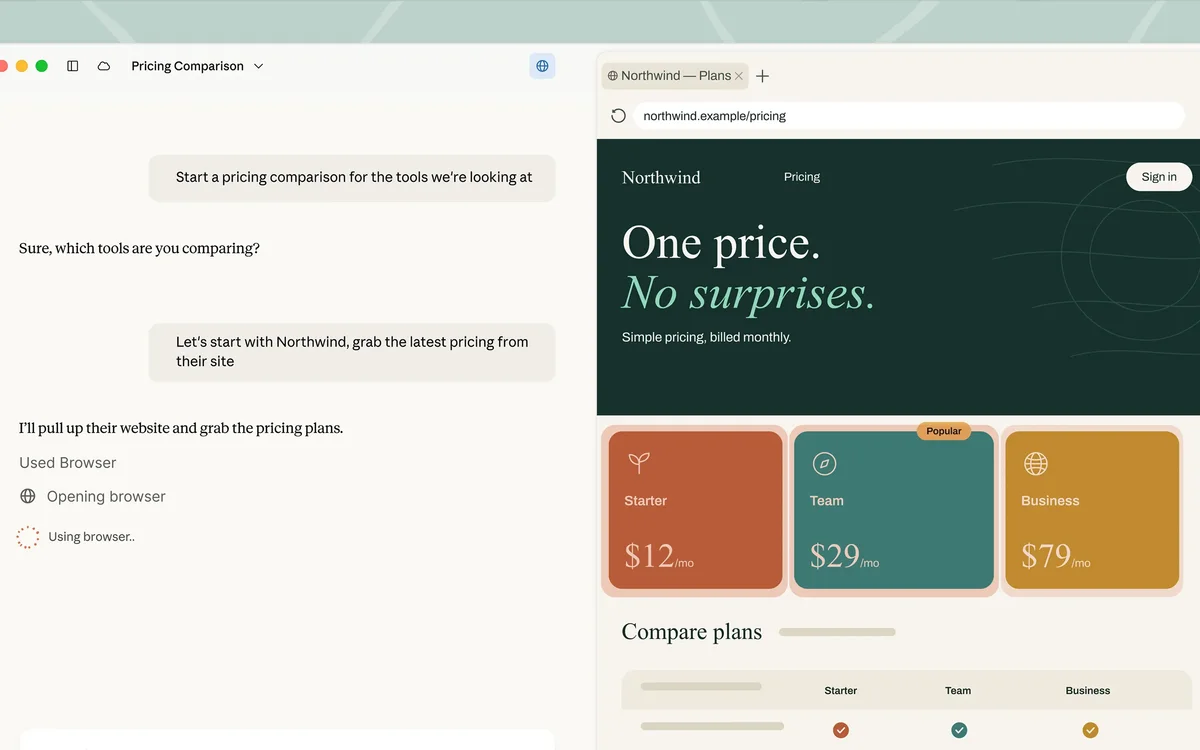
Official product image of Claude beside a page in the browser, so you can read the source while you ask about it. Source ↗
Pricing model
Freemium
Main input
A question, a file, a live page, or a repository
Output
A reply, a file, or an edit to the codebase
Access
Web, desktop, and mobile chat, plus Claude Code on a paid plan
Is Claude right for you?
Use Claude when you will match the task to the surface. Chat is where you rewrite a memo, summarize a file, or ask a question, and a free account can start there with limited use and no payment required. The side-by-side workspace is for reading a live page while you ask about it. The pricing page says Cowork is now just Claude and is rolling out to Pro and Max, with more plans to follow, so treat that layout as a capability that is still being rolled out rather than as a second product with its own price. Claude Code is for a repository you can point it at. Pro is the first individual plan that lists Claude Code and the larger usage. Max is the plan where you choose 5x or 20x more usage than Pro, starting from the published monthly amount. A team that needs shared billing looks at Team or Enterprise after the individual surface already fits the job.
A good fit for
Rewriting or summarizing something you can paste or upload, then correcting the result.
Reading a live page beside the chat when the answer has to come from that page.
Editing a repository with Claude Code when the files, not a pasted snippet, are the source.
Know the trade-offs
Chat and Claude Code are different surfaces. A coding task needs the repository open in Claude Code.
The pricing page says Cowork is now just Claude, rolling out to Pro and Max, with more plans to follow.
Max lets you choose 5x or 20x more usage than Pro. The amount for the option you pick is the one at checkout.
Chat, a live page, and a repository
Work from a draft in chat
Chat is the everyday surface. You bring a question or a piece of writing, on the web, the desktop app, or a phone. The free plan lists chat, web search, creating files, memory across conversations, connectors to other tools, and artifacts you can keep. Memory means a later conversation can pick up context from an earlier one, which helps a draft that spans a few sittings and hurts if you wanted a clean slate. Artifacts are the pieces of work that stay put, rather than scrolling away in the thread.
Treat the reply as a draft. If you asked for a summary, compare it with the source before you send it. If you asked for a rewrite, keep the sentences that sound like you and replace the ones that do not. File creation is part of this surface, so a result can leave the thread as a document. Projects, the larger container for ongoing work, are listed with a cap on the free plan and without that cap further up. You do not need a project to rewrite one memo.
Official product image of Claude beside a page in the browser, so you can read the source while you ask about it. Source
Read a live page while you ask
Some questions are about a page that is already open: a policy, a spec, a product screen. The product image shows the chat next to an in-app browser, which is the layout for that job. You can see the paragraph you mean instead of pasting it, and you can ask for the part that applies to your case. The homepage describes this as building, next to brainstorming in chat. The pricing page’s latest note says Claude Cowork is now just Claude, rolling out to Pro and Max, with more plans to follow.
So the layout is real, and who can open it is still a rollout. If you only need to rewrite text you already copied, stay in chat. Open the side-by-side view when the page itself is the source and you would otherwise lose your place by switching windows. Keep the conversation next to the paragraph you mean, and ask for the part that applies to your case.
Claude Code is the coding tool. The docs call it an agent that reads your codebase, edits files, runs commands, and works with your development tools. It is available in the terminal, in an IDE, in the desktop app, and in the browser. That is a different job from chat. You point it at the repository, name the bug or the feature, and read the files it changes. A pasted snippet in chat cannot see the callers of a function. Claude Code can, because it is in the tree.
The Pro card is where Claude Code shows up among the additions over the free account, together with more usage and other tools such as Design and scheduled tasks. The Code docs do not replace that plan list. If you are still exploring an idea, chat is enough. Move to Claude Code when the change has to compile, pass a test, or land in a specific file. Read the diff the same way you would read a teammate’s change. The tool running a command is not the same thing as the command being the one you wanted.
Paste the memo, say who will read it, and ask for a tighter version that keeps every commitment you actually made. Then read the result against the original. Restore any number, date, or name that moved. Ask for a second pass only on the paragraphs that are still vague.
These steps suggest a writing session in chat, not a coding session and not a browse of a live site. You can do this kind of draft on the free account’s limited use. Stop when the memo sounds like you, even if a later plan would allow a longer thread.
Answer from a page you have open
Open the page you were sent, the policy or the spec, in the browser beside the chat. Ask for the section that answers one concrete question, and ask it to quote the heading so you can find that section yourself. If the reply cites a rule you cannot see on the page, discard it.
This is the side-by-side job. It is worth doing when scrolling away would make you lose the paragraph. The pricing note says that workspace is rolling out to Pro and Max, with more plans to follow, so if you cannot open it, paste the relevant section into chat instead of assuming the layout is on every account.
Fix a failing check in a repository
Open the repo in Claude Code, name the command that failed, and ask it to change the code that causes the failure. Let it read the tree and run the command. When it stops, read the files it edited and rerun the check yourself if you need to see the output. Reject a change that deletes the test or edits an unrelated package.
Chat is the wrong surface once the failure depends on other files. These steps suggest Claude Code, which the Pro plan lists, rather than a longer free-form conversation. Keep the repository as the source of truth.
How to get started with Claude
1
Bring the real source
Paste the draft, open the page, or point Claude Code at the repository. A paraphrase of the source is how details get lost.
2
Ask for one outcome
A tighter memo, the section that answers a question, or a fix for a named failure. Do not stack a rewrite and a refactor in the same request.
3
Check the result against the source
Compare names, numbers, and the lines that changed. Keep what matches the source. Redo only the part that does not.
4
Change surface only when the job changes
Stay in chat for writing. Use the page layout when you must see the page. Use Claude Code when the files have to change.
Claude has five pricing plans available — Free, Pro, Max, Team, and Enterprise. The free plan offers limited use with no payment required. Pro is $17 per month when $200 is billed up front, or $20 if billed monthly, and is the individual plan that adds more usage plus Claude Code. Max is From $100 per month, and you choose 5x or 20x more usage than Pro. Team is for groups of 2 to 150. A standard seat is $20 per seat per month if billed annually, or $25 if billed monthly. A premium seat is $100 per seat per month if billed annually, or $125 if billed monthly. Enterprise is listed at US$20 per seat per month, billed annually, plus usage that scales with the model and the task. The pricing page says Claude Cowork is now just Claude, rolling out to Pro and Max, with more plans to follow.
Free
Chat, search, files, memory, connectors, and artifacts while the included use lasts.
No payment required
Limited use
Limited use with no payment required
Projects are capped
Pro
Everyday work that needs Claude Code or more usage than the free account.
$20 if billed monthly
$17 per month when $200 is billed up front
More usage than the free plan
Claude Code, plus design and scheduling tools listed on the card
Max
Someone who spends most of the day in Claude and needs a higher usage multiple.
From $100 per month
Choose 5x or 20x more usage than Pro
5x or 20x more usage than Pro
Higher output limits and priority access at busy times
Team
A group of 2 to 150 people that wants central billing.
$25 if billed monthly
Standard seat $20 per month if billed annually; premium seat $125 if billed monthly
Standard and premium seats
Claude Code and the shared admin tools listed for Team
Enterprise
An organization that sets spend limits and needs finer admin controls.
US$20 per seat / month
Billed annually, plus usage that scales with the model and the task
Spend limits and role-based access
Usage cost in addition to the seat
Usage limits apply, and the prices shown do not include tax. Annual billing on Pro is the $17 figure with $200 up front, not a rule that you must pay annually. On Max, pick 5x or 20x and pay the amount checkout shows for that option. You can cancel; files can remain when a paid period ends and the account returns to the free plan.
ChatGPT is a separate assistant with its own plan gates. Stay there when the files and the habit are already there. Claude is the fit when you want chat, a page beside the thread, or Claude Code on a repository.
Cursor puts Tab autocomplete and an agent diff inside its own editor. Claude Code follows a Claude subscription and runs in the terminal, an IDE, the desktop app, or the browser. Pick the editor your team already keeps open.
Notion AI works inside the wiki and the databases the team already maintains. Claude fits when the job starts as a chat, an uploaded file, a live web page, or a repository rather than a page in that wiki.
Claude: common questions
Can I use Claude without paying?
Yes. The free plan offers limited use with no payment required. The free card lists chat, web search, file creation, memory, connectors, and artifacts. Claude Code is listed on Pro, not on that free card.
Leave chat when the source is a live page you need to see, or when the change has to happen inside a repository. The page layout is the side-by-side view. Claude Code is the repository tool. A rewrite of text you already have can stay in chat.
An agent that reads your codebase, edits files, and runs commands. You can run it in the terminal, an IDE, the desktop app, or the browser. It is not the same thing as asking chat to guess at a snippet.
Pro is $20 if billed monthly, or $17 per month when $200 is billed up front. Max is From $100 per month and lets you choose 5x or 20x more usage than Pro. The checkout total for the multiple you select is the one that applies.
Team standard is $20 per seat per month billed annually, or $25 if billed monthly. Premium is $100 per seat per month billed annually, or $125 if billed monthly, for groups of 2 to 150. Enterprise is US$20 per seat per month billed annually, plus usage.
NavHunt did not run Claude. Plan wording comes from the public pricing page and homepage reviewed on 6 October 2026. Claude Code’s description comes from its public overview. The picture shows chat beside a page in the browser.