Cleanup.pictures is a single-purpose retouch tool: cover people, objects, or marks, then let the fill guess what was behind the unwanted text or other distractions. You may import large files, but Export will be limited to 720px on the free version, while Pro has no size limit.
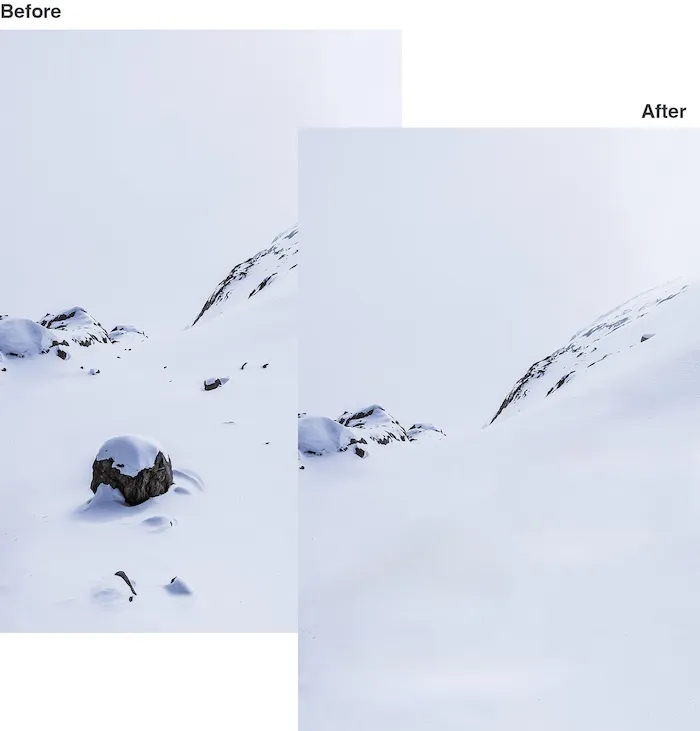
Before and after object removal: a dark rock on a snowy slope is gone in the After frame. Source: https://cleanup.pictures/. Source ↗
Pricing model
Freemium
Main input
Photos uploaded for brush-based cleanup
Output
Retouched images with covered objects removed
Access
Web editor on mobile and desktop
Is Cleanup.pictures right for you?
Choose Cleanup.pictures when the job is object removal, not a full creative suite. Cover the distraction and export. Stay on Free if 720px output is enough. Pay Pro when you need any-size files, the High quality refiner, and a subscription will work on both mobile and desktop. Pick another product if you need shared seats or broader generative design tools.
A good fit for
Photographers clearing people, stamps, or small defects from one frame
Real-estate and shop teams tidying room or product photos
Solo editors who want freemium object removal without a design suite
Know the trade-offs
Export will be limited to 720px on the free version
Pro billing is required for unlimited resolution exports
This page focuses on cleanup, not a full multi-tool studio
How Cleanup.pictures removes objects
Before and after object removal: a dark rock on a snowy slope is gone in the After frame. Source: https://cleanup.pictures/. Source
Cover distractions, then rebuild the scene
Cleanup.pictures is an inpainting editor, not a clone-stamp lesson. You mark the unwanted person, object, or graphic, and the fill tries to guess what was behind the unwanted text, people, or other clutter from nearby pixels. The job stays narrow: delete the distraction and keep the rest of the frame.
The same path covers product plates, room photos, and portraits. It does not replace lighting or a full layer-based studio. If a first pass looks soft, widen the covered area and run again before you change tools.
You can import and edit large pictures, but Export will be limited to 720px for the free version. Free still lists unlimited images at that capped size, enough for proofs and low-stakes posts. Pro removes the size ceiling and adds the High quality refiner on the pricing card.
The export size is the Free versus Pro decision: free files stay capped, and Pro is what you check when the published file has to keep its original resolution.
Text, logo, and watermark cleanups on owned photos
Beyond people and props, Cleanup.pictures can remove any unwanted text, logo, date stamp, or watermark from a frame you are allowed to edit. Cover the mark, run the fill, and inspect edges before export. Listing and shop shots often need this small cleanup without a reshoot.
Stay inside images you own or are cleared to alter. The tool repairs covered pixels; it does not grant rights to edit third-party stock. When ownership is unclear, use another source file.
Upload the photo, brush over tourists or a date stamp, and run removal. Export on Free only when a 720px proof is acceptable.
If edges still show a halo, suggest a wider cover pass before you upgrade. Keep Pro for the final file when resolution matters.
Tidy a listing or product photo
Brush out cables, clutter, or a stray label on a room or product shot, then rebuild the surface. Free exports work for internal review; Pro fits storefront masters.
After cleanup, suggest a crop for the channel aspect ratio instead of deleting more of the scene than you need.
How to get started with Cleanup.pictures
1
Open the site and drop in a photo
Go to cleanup.pictures and drag an image into the editor to start for free.
2
Cover the unwanted area
Paint over people, objects, text, or marks so the fill has a clear region to rebuild.
3
Run removal and check the result
Let the service rebuild the covered pixels, then widen the mask and retry if edges look wrong.
4
Export within your plan
Download on Free at up to 720px, or use Pro when you need any-size output and the High quality refiner.
Cleanup.pictures is free unless you need better quality and hi-resolution processing. The FAQ lists Pro at $5 per month or $36 per year ($3 per month) for images of any size, with a trial for HD quality, and says the subscription will work on both mobile and desktop.
Free
Drafts and posts where 720px export is enough
Free
No paid subscription required for the capped export tier
Unlimited images
Export will be limited to 720px
Brush-based object removal
Pro
Editors who need any-size exports and the High quality refiner
$5 per month or $36 per year ($3 per month)
Monthly or yearly; HD trial mentioned on the homepage
Unlimited images
No size limit for the Pro version
High quality refiner
Works on mobile and desktop
Confirm live prices and trial terms on the homepage before you pay. Other rows on the same pricing block are not treated here as Cleanup Pro web subscription prices.
You need cutout and batch product-image utilities beyond brush inpainting
Cutout Pro focuses on cutout-oriented product workflows, while Cleanup.pictures stays on brush-covered object removal with a simple Free versus Pro export-size split.
You want generative fill inside a broader Adobe creative workflow
Adobe Firefly sits inside a wider generative Creative Cloud context, whereas Cleanup.pictures is a focused inpainting page for covering unwanted elements and rebuilding the scene.
You want mobile beauty and portrait retouch tools instead of object fill
Airbrush leans into portrait beautification on mobile, while Cleanup.pictures targets object and text removal through a cover-and-rebuild pass with an explicit free export limit.
Cleanup.pictures: common questions
What does Cleanup.pictures do?
It is an inpainting editor for object removal: cover unwanted people, objects, or marks, then export a cleaner photo.
The FAQ says clone tools need a background reference, while Cleanup.pictures aims to guess what was behind the unwanted text, people, or objects in a few clicks.
NavHunt did not run Cleanup.pictures. Limits and prices here come from the public Cleanup.pictures homepage reviewed on 6 October 2026, including the free 720px export rule, Pro billing lines, and mobile and desktop subscription access. Confirm live checkout terms on the official site before you buy.