DeepL Translator is DeepL’s core translation product for turning source text, documents, media, and speech into target-language output. The homepage positions an end-to-end Language AI platform that translates text, files, media formats, and voice, with a Free version and a free trial path into Pro. Pro pricing on the plans page lists Individual, Team, Business, and Enterprise tiers, plus an Annual Write Pro add-on for writing assistance. File translation is framed as drag-and-drop for major formats into 100+ languages while preserving layout. Customer-support material describes multilingual support workflows as a use case, not as a finished deployment NavHunt verified for any specific company.
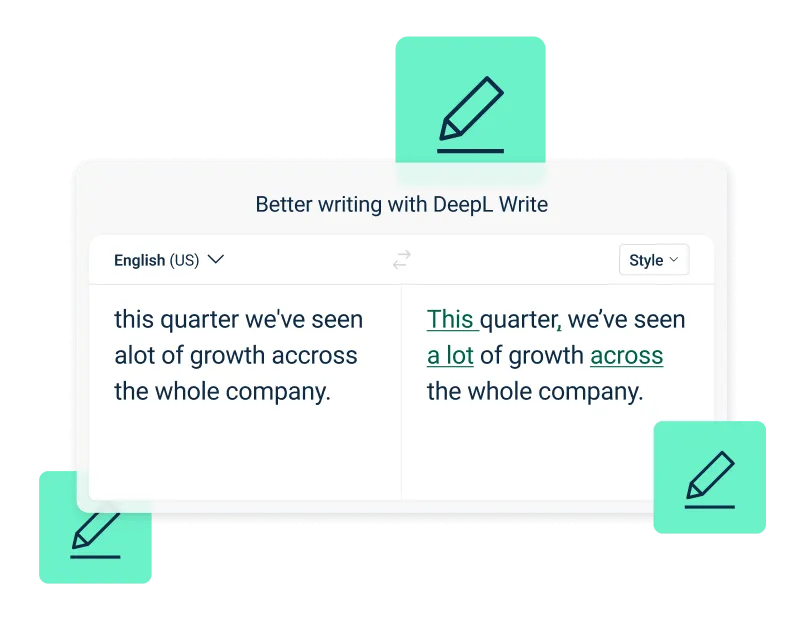
DeepL Write editor correcting grammar in a sentence Source: https://www.deepl.com/en/pro. Source ↗
Pricing model
Freemium
Main input
Text, files, media, and speech
Output
Translated text, documents, and voice
Access
Web app, desktop and mobile apps, browser extension, API
Is DeepL Translator right for you?
DeepL Translator fits teams that need a dedicated translation surface for text and documents, with a clear Free version Individual path and paid Pro tiers that raise character, file, glossary, and admin limits. The product is a strong fit when glossaries, style rules, saved translations, and team administration matter more than a general-purpose chatbot. Pause if you only need occasional free web translation and the Free version allowances already cover you, or if your job is mainly speech-to-text tooling rather than translation quality. Enterprise buyers should expect custom pricing and sales contact rather than a self-serve sticker price. Treat the customer-support pages as scenario guidance for how teams can apply Language AI in help desks; they do not prove that DeepL Translator is already wired into your stack. Confirm character caps, file quotas, fair usage notes, and add-on billing on the Pro page before rolling out across a department.
A good fit for
Individuals who need Professional-grade translations for single users and can start from the Free version or a 30-day trial
Teams that want Increased translation productivity and control for teams with shared glossaries, bulk file translation, and administration
Businesses planning Multilingual communication management for businesses with higher file and glossary ceilings
Organizations evaluating Scalability, control, and security for organizations under Enterprise custom pricing
Know the trade-offs
Free web text entry on the homepage shows a 0 / 500 style counter, so long-form drafting may push you toward Pro character allowances quickly
A fair usage policy applies on higher tiers, and Business unlimited character claims sit next to that note—read the plan footnotes before assuming no caps
Annual Write Pro add-on billing is separate from Translator seats; do not assume writing assistance is included on every plan
Customer-support pages describe how Language AI can help agents; they are use-case education, not proof that DeepL Translator is already live in your help desk
What DeepL Translator does
Interactive text translation with a Free version path
DeepL Translator’s web surface lets you paste or type source text, detect or set languages, and read translation results beside the input. The homepage Free version Individual messaging and Start free trial prompts make it clear you can try the translator without buying Pro first. The on-page editor shows a character-style counter (0 / 500 on the homepage layout), which signals that casual free use is bounded even when the product remains available without a paid seat.
For day-to-day work, this feature is the fastest way to check phrasing, rewrite short messages, or compare a sentence across languages before you involve file workflows. If you outgrow free text limits, Pro Individual is framed as Professional-grade translations for single users with monthly character allowances, glossaries, and saved translations. Keep the Free version for spot checks, and move to Pro when glossaries or higher volume become part of the job rather than occasional lookups.
File translation is a first-class path on the homepage: Drag-and-drop translation for any file type, with copy that stresses translating documents in major formats into 100+ languages while preserving layout and visual context for bulk and enterprise workflows. You select a source language, pick a target such as English (American), and either drop a file or choose one from your device. That workflow matters when layout retention is part of the deliverable, not only when you need a raw text dump.
Pro plan copy ties file quotas to seats: Individual lists a small monthly file count, Team raises the shared monthly file pool and adds bulk file translation, and Business goes higher still. Team plans emphasize Increased translation productivity and control for teams, including shared style rule lists and glossaries that keep terminology aligned across reviewers. Use file translation when the source of truth is a document; stay on interactive text when you only need a paragraph. Always re-check critical legal or regulated wording with a human reviewer after machine output.
Voice translation and platform suite around Translator
Beyond text and files, the homepage markets real-time voice translation that still sounds like you, plus DeepL Voice examples that show a customer speaking Spanish and an agent answering in English (UK). Translator sits inside a broader Language AI platform that also points to DeepL Write, DeepL Voice, DeepL API, and integrations. The Pro page includes a monthly DeepL Voice minute allotment per user on several Translator plans, so voice is adjacent to the Translator seat rather than a totally separate story.
Treat voice as a companion capability when meetings or live conversations need spoken coverage, not as a replacement for document QA. The customer-support use-case page explains how live voice translation can help virtual and in-person conversations, including mentions of Microsoft Teams and Zoom for meetings. If your primary need is only offline document translation, you can ignore voice until a pilot requires it.
DeepL Write editor correcting grammar in a sentence Source: https://www.deepl.com/en/pro. Source
Glossaries, style rules, and team controls on Pro
Paid Translator plans advertise customization that free casual use does not emphasize: glossaries, saved translations, full-page translation, style rule lists, team administration, analytics, and single sign-on as you move from Individual to Team and Business. Business copy positions Multilingual communication management for businesses with translation memory and higher glossary and file ceilings. Enterprise messaging focuses on Scalability, control, and security for organizations with custom limits, dedicated account help, and premium support.
These controls are the reason to pay when brand terms, product names, and tone must stay consistent across languages. The customer-support use-case page explains glossaries for technical terminology, style rules for tone, and translation memory for previously approved phrasing. Start with one glossary on Individual if you work alone; move to Team when multiple people must share rules and reporting. The picture shows the DeepL Write editor marking grammar in one sentence. That surface is the writing assistant, separate from the Translator workspace. Confirm which add-ons (Write Pro or Translation Flow) are available on your tier before budgeting.
Translate customer replies into the language the customer used
Support managers evaluating DeepL Translator often start from the customer-support use-case page, which describes instant translations and writing suggestions so agents can answer in the language a customer prefers. That page shows how Language AI can sit beside chat tools and how glossaries keep product names consistent.
Use the Free version or a trial to translate sample tickets, then suggest glossary entries for SKUs and policy phrases before buying Team seats. If agents only need occasional sentence help, stay on free text translation. If the queue must share style rules and file quotas, plan for Team or Business after you measure monthly character and file demand.
Localize marketing and internal documents with layout kept intact
Campaign and operations teams can drop slide decks, briefs, or policy PDFs into file translation when they need 100+ language coverage and layout preservation. Homepage messaging stresses secure document translation for bulk and enterprise workflows, which fits handoffs where design structure matters as much as wording.
Run a small batch on trial seats first, then suggest a shared glossary for brand slogans before widening access. Individual may be enough for a solo localization specialist; Team fits when several reviewers share bulk file translation and administration. Re-read legal disclaimers and regulated claims after translation rather than publishing machine output untouched.
Build multilingual product copy with the DeepL API path
Product teams that need translations inside their own apps can integrate the DeepL API and follow the developers quickstart: sign up for an API plan, obtain a key, and send POST /v2/translate requests, switching to the api-free host when on a free API plan. Homepage and developer materials present the API as the way to integrate DeepL Translator-quality output into software, separate from the interactive website editor.
Prototype with a free API key on non-production text, then suggest moving to a paid API plan only after you estimate character volume. Website Pro seat prices and API metering are different bills. Subscription decisions stay on the Pro page, and API billing stays on the developer plans page. Keep secrets out of client-side code and store keys in environment variables as the docs advise.
How to get started with DeepL Translator
1
Open the translator and try the Free version
Go to deepl.com, use the on-page translator or open Translator, and translate a short sample with language detection or manual language picks. Note the free text counter and whether file drop meets your format needs before you start a trial.
2
Start a free trial and compare Pro plan limits
Use Start free trial / Free for 30 days on Individual or Team to exercise glossaries, file quotas, and saved translations. Compare Individual, Team, Business, and Enterprise allowances against your monthly character and file volume.
3
Add terminology controls and optional Write Pro
Create glossary entries for product names and banned phrasings, then decide whether the Annual Write Pro add-on is required for writing assistance. Keep Translator seats and Write Pro billing distinct in your budget.
4
Roll out apps or API only after a measured pilot
Install desktop, browser, or mobile apps if editors work outside the website, or follow the developers quickstart for API keys if you are embedding translation. Expand seats after the pilot shows clear quota headroom and review quality.
Germany (EUR €) annual list prices from the Pro page: Individual €7.49 per month billed annually; Team €24.99 per user/month billed annually; Business €49.99 per user/month billed annually; Enterprise custom pricing. Annual Write Pro add-on €6.99 per user/month (billed annually), VAT included. Save 16% with annual billing. Free version available; Individual and Team show Try for free Free for 30 days.
Free
Casual text checks and light exploration before a trial
Free
none
Free version web translator access
Start free trial path into Pro
On-page text entry with a visible character-style counter
Individual
Professional-grade translations for single users
€7.49
per month, billed annually
No data training
300,000 characters per month
3 file translations per month
1 glossary and 1 saved translation
Full-page translation
Write Pro available as add-on
30 min of DeepL Voice included per user/month
Team
Increased translation productivity and control for teams
€24.99
per user/month, billed annually
Everything in Individual, plus higher quotas
1,000,000 characters per user/month
20 file translations per month with bulk file translation
5 shared style rule lists and 5 glossaries
10 saved translations
Team administration, analytics, SSO
Write Pro available as add-on
30 min of DeepL Voice included per user/month
Business
Multilingual communication management for businesses
€49.99
per user/month, billed annually
Everything in Team, plus higher ceilings
Unlimited characters with fair usage policy note
100 file translations per month
20 shared style rule lists
Unlimited glossaries and saved translations with footnote
Translation memory
User provisioning (SCIM) and domain capture
99.0 % availability
Write Pro included; Translation Flow add-on available
30 min of DeepL Voice included per user/month
Enterprise
Scalability, control, and security for organizations
Custom pricing
contact sales
Custom character and file limits
Unlimited shared style rule lists and glossaries with footnote
Translation memory
Bring your own key
99.9 % availability
Dedicated account team and premium support
Translation Flow add-on available
Amounts above are annual EUR figures shown for Germany on the Pro page (€7.49, €24.99, €49.99, and Write Pro €6.99). Footnotes mark fair usage and unlimited items. Monthly billing, taxes outside the VAT-included add-on note, and API metering are not treated as the same as these website subscription prices. Confirm live checkout totals before purchase.
You want a ubiquitous free web translator with the widest casual language reach and no DeepL Pro seat to manage.
Google Translate is the default consumer translator many people already know, with broad language coverage and simple web access. DeepL Translator competes on Pro glossary controls, file layout preservation messaging, and business plan administration rather than on being the most familiar free box on the internet.
You are comparing specialist translation web apps and want another focused translator UI before paying for DeepL Pro.
Lara Translate is another translation-oriented product in this set, useful when you are shortlisting dedicated translators rather than general AI chat tools. DeepL Translator differentiates with a documented Free version plus Individual, Team, Business, and Enterprise ladder, voice adjacency, and an official API quickstart for product teams.
Your main job is speech recognition and audio pipelines rather than document and text translation quality.
Gladia centers on audio and speech workflows, which matters when transcripts are the primary artifact. DeepL Translator remains the better shortlist item when the deliverable is bilingual text or layout-aware file translation, with voice presented as part of a wider Language AI suite instead of as a pure ASR platform.
DeepL Translator: common questions
Is DeepL Translator free?
Yes. The Pro page lists a Free version beside Individual and Team trials. Paid Individual, Team, Business, and Enterprise plans raise limits for characters, files, glossaries, and admin features.
Homepage messaging covers translating text, files, media formats, and voice. File translation is described as drag-and-drop for major formats into 100+ languages with layout preservation.
Individual targets Professional-grade translations for single users with lower monthly character and file caps. Team is positioned for Increased translation productivity and control for teams, with higher per-user characters, more file translations, bulk file translation, shared style rules, and administration features.
Write Pro is sold as an add-on for writing assistance inside the same tool used to translate. The Pro page lists Annual Write Pro add-on pricing separately from Translator plan seats.
Does the customer-support page mean DeepL is already in my help desk?
No. That page explains how Language AI can support multilingual customer experiences, glossaries, and voice scenarios. Treat it as use-case education; wire-up and rollout remain your team’s project.
Developer docs walk through signing up for an API plan, copying an API key, and sending a translate request. Free API plans use the api-free host instead of api.deepl.com. API plan choice is separate from website Translator Pro seats.
Who is DeepL Translator trusted by according to the site?
Homepage and Pro marketing repeat Trusted by over 200,000 businesses globally and highlight customer stories such as Sumitomo Corporation. Use those as vendor claims to verify on the official customer stories pages if needed.
NavHunt did not run DeepL Translator. Plan names, EUR annual list prices, trial copy, and API key steps come from the public homepage, pricing pages, support guidance, and the developers quickstart reviewed on 6 October 2026. The picture on this page is the DeepL Write editor, a writing surface, not the translator workspace. Recheck limits and checkout totals on deepl.com before you buy.