GitHub Copilot is GitHub’s AI coding agent for editor, terminal, desktop, and github.com workflows. It can complete code, answer chat questions, run agent tasks from issues toward pull requests, and help in the CLI. Individuals can begin on a Free tier with limited functionality for individual developers, including a monthly completion cap. Free stays the limited individual tier; Pro, Pro+, Max, Business, and Enterprise add GitHub AI Credits for chat and agents. Every plan includes a monthly allowance of credits for those chat and agent surfaces. Code completions and next edit suggestions are positioned separately from credit-consuming chat and agent features. Copilot usage is measured in AI credits under the billing model GitHub documents for paid seats.
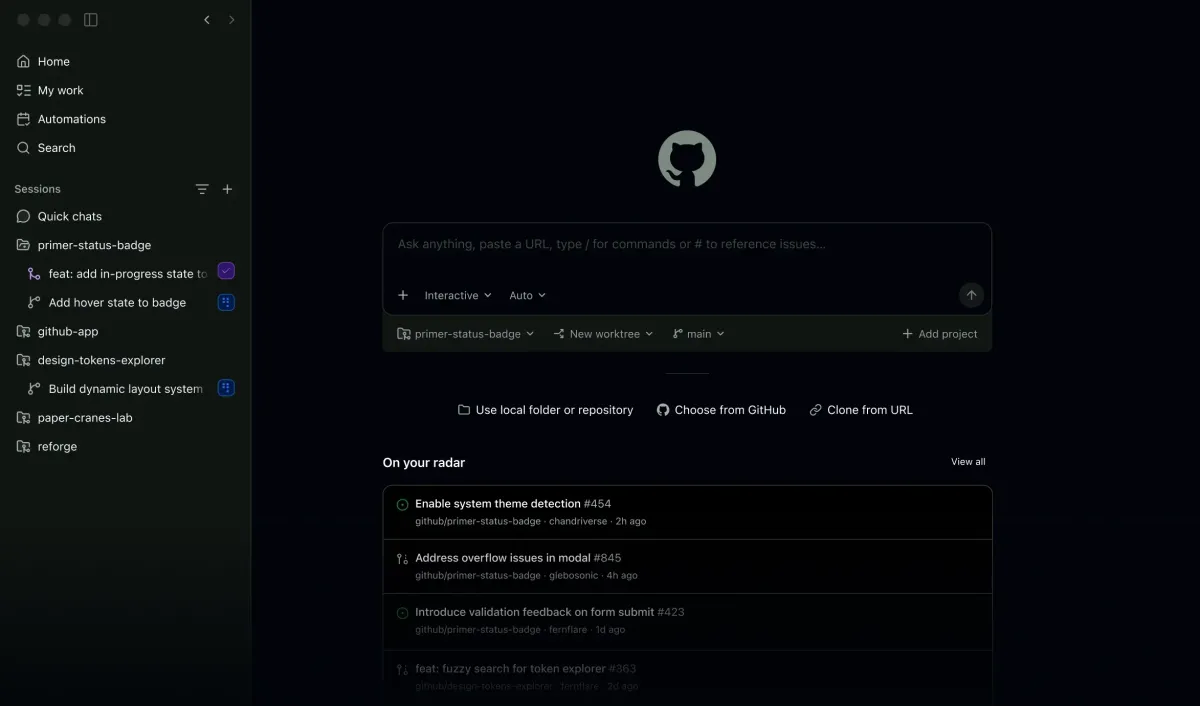
GitHub Copilot workspace with the chat composer, session sidebar, and an issue list for the primer-status-badge repo. Source: https://github.com/features/copilot. Source ↗
Pricing model
Freemium
Main input
Code context, chat prompts, and assigned agent tasks
Output
Completions, edits, chat answers, and agent-produced changes
Access
Editor, CLI, desktop app, and GitHub.com
Is GitHub Copilot right for you?
GitHub Copilot is a strong default when your work already lives on GitHub and you want one assistant that can suggest code in the IDE, take agent-driven tasks, and stay available in the CLI and on the web. Start on Free only if 2,000 completions per month and a tight chat allowance are enough to learn the product—GitHub Copilot Free users are limited to 2000 completions and 50 chat requests before paid headroom matters. Move to a paid individual plan when chat, agents, and CLI usage burn through the Free credit allotment. Copilot Free and Copilot Student both have an allowance of AI credits, but heavy agent weeks still push people toward Pro or higher. Prefer Business or Enterprise when you need admin controls rather than personal seats; on those org paths, Included AI credits are shared org-wide. Skip Copilot if you mainly need a single-purpose SQL writer, a cloud IDE that builds whole apps from prompts, or a vendor tied to another cloud’s identity stack—those jobs are clearer on narrower alternatives. Confirm seat price and credit math on the docs plans table before buying, because marketing credit breakdowns on the plans page do not always match the docs seat table.
A good fit for
Developers who want IDE completions plus chat and agents inside GitHub
Individuals ready to pay for higher monthly AI credit allowances
Organizations that need pooled credits and admin spending controls
Know the trade-offs
Free access has limited functionality for individual developers and caps completions and chat
Chat, agents, CLI, Spaces, and related features draw GitHub AI Credits; completions do not
Published credit and price breakdowns differ across marketing and docs pages—use one table, not a merge
What GitHub Copilot does in daily coding work
GitHub Copilot workspace with the chat composer, session sidebar, and an issue list for the primer-status-badge repo. Source: https://github.com/features/copilot. Source
Completions and next edit suggestions in the editor
GitHub Copilot sits in the editor to explain concepts, complete code, propose edits, and validate files with agent mode. That keeps routine typing, refactors, and file-level fixes close to the buffer you already have open, instead of forcing a separate chat-only workflow for every small change.
Code completions and next edit suggestions are called out as features that do not consume GitHub AI Credits, which matters when you are budgeting chat and agent work. On Free, expect a hard monthly completion ceiling—2,000 completions per month—so heavy autocomplete users should watch usage before relying on Free as a long-term plan.
Beyond inline coding help, GitHub Copilot can run where you already work: in GitHub, your IDE, the CLI, project tools, chat apps, and custom MCP servers. You can launch work from GitHub, track progress across multiple agents, review changes, and merge completed work from a desktop workspace built on GitHub, which suits issue-to-PR loops more than one-off snippet generation.
Chat, agent mode, code review, Copilot cloud agent, Copilot CLI, and related surfaces consume GitHub AI Credits. GitHub AI Credits are how you pay for AI usage beyond the completion path, so agent-heavy weeks drain allowances faster than quiet autocomplete days. Free still exposes CLI and agent mode, but with limited functionality for individual developers and a small chat budget.
The product messaging emphasizes going beyond one-size-fits-all by choosing among leading LLMs optimized for speed, accuracy, or cost, and by using GitHub Copilot, custom agents, or third-party agents you already rely on. Free-tier copy highlights access to Haiku 4.5, GPT-5 mini, and more, while higher individual plans advertise premium models and larger credit pools for sustained agent workflows.
For teams, Business and Enterprise framing focuses on pooled credits, audit logs, and enterprise-grade controls for agent usage and MCP integrations. That is the path when personal Pro seats cannot give finance or security a single place to set spend and access rules. Individual Free, Pro, and Pro+ subscribers should also read GitHub’s privacy terms about training opt-out, because data-handling rules differ by plan class.
Stay in flow while writing and editing application code
Use GitHub Copilot in your IDE when you need the assistant to suggest the next lines, explain a confusing block, or propose a focused edit without leaving the file. This is the everyday path for feature work, bug fixes, and learning an unfamiliar library surface inside the project.
Keep an eye on Free’s 2,000 completions per month if autocomplete is always on. Paid plans keep completions off the credit meter, so moving up is mostly about chat and agent headroom rather than unlocking basic inline suggestions.
Drive issue-to-pull-request work with agents
Assign larger tasks to agents when you want planning, exploration, and background execution across repositories instead of only local completions. Copilot’s agent surfaces are meant to take work from an open issue toward reviewed, mergeable changes while you supervise from GitHub or the desktop app.
Agent runs spend GitHub AI Credits, so this use case is a poor fit for Free once you pass the small chat allotment. Pro through Max raise monthly credit totals; Business pools credits when several people share agent load.
Command-line and multi-surface assistance
Reach for Copilot CLI and github.com surfaces when the task is shell-oriented, spans multiple repos, or needs the same assistant outside the IDE. Free plan supports CLI and agent mode, which helps you evaluate those flows before paying.
If CLI chat and agents are your primary habit, budget credits explicitly: GitHub AI Credits are how you pay for AI usage in GitHub Copilot for those interactions, while Code completions and next edit suggestions remain on a separate track.
How to get started with GitHub Copilot
1
Open the Copilot feature page and pick a starting plan
Begin at the official GitHub Copilot page, compare Free with paid individual and business options, and decide whether a completion-capped Free trial of the product is enough or whether you need paid credits immediately.
2
Install or enable Copilot in your editor and sign in
Connect Copilot in VS Code or another supported editor, or open the desktop app and CLI paths GitHub documents, then sign in with the GitHub account that should hold the Free or paid entitlement.
3
Try completions first, then chat and agents
Validate inline completions and next edit suggestions on real files, then spend a little chat or agent usage to see how fast GitHub AI Credits move on your workload before you upgrade.
4
Upgrade or switch to org seating when limits bind
If Free’s completion or chat caps block you, upgrade through Copilot settings or the marketing plans page; for teams, evaluate Business or Enterprise pooled credits and admin controls instead of stacking personal seats.
Individual paid figures below follow the docs plans table: Copilot Pro $10 USD, Copilot Pro+ $39 USD, and Copilot Max $100 USD per month with listed base, flex, and total AI credits. Free is listed on the product page at $ 0 USD per user / month with 2,000 completions per month. Organization seats on the same docs page list Copilot Business $19 USD and Copilot Enterprise $39 USD per granted seat per month. Every plan includes a monthly allowance: 1 AI credit = $0.01 USD.
Free
Individuals evaluating Copilot with capped completions and limited chat
$ 0 USD
per user / month
2,000 completions per month
Limited GitHub AI Credits for chat and agent features
Access to Haiku 4.5, GPT-5 mini, and more
Copilot CLI and community support
No credit card required
Pro
Individuals who need a modest monthly AI credit allowance beyond Free
$10 USD
per month
Base credits 1,000
Flex allotment 500
Total monthly AI credits 1,500
Paid individual plan above Free
Pro+
Individuals who want a higher monthly AI credit allowance than Pro
$39 USD
per month
Base credits 3,900
Flex allotment 3,100
Total monthly AI credits 7,000
Includes everything positioned above Pro in docs
Max
Individuals with sustained, high-volume agent workflows
$100 USD
per month
Base credits 10,000
Flex allotment 10,000
Total monthly AI credits 20,000
Highest individual monthly AI credit allowance in the docs table
Business
Organizations that want pooled credits and admin controls
$19 USD
per granted seat per month
1,900 GitHub AI Credits per user per month toward the shared pool
Usage beyond the pool charged under usage-based billing
The plans-page flex lines (Pro plan $5 per month, Pro+ plan $31 per month, Max plan $100 per month) are a different breakdown from the docs seat table above. GitHub Copilot Free users are limited to 2000 completions and 50 chat requests (including Copilot Edits). Code completions and next edit suggestions do not use credits; chat, agents, CLI, Spaces, and related features do. Usage beyond included credits is billed in AI credits (1 AI credit = $0.01 USD). Codespaces compute and Large File Storage add-on prices on github.com/pricing are not Copilot seat fees.
Your team already builds primarily on AWS and wants an assistant tied to that cloud.
Amazon Q Developer is aimed at AWS-centric development and cloud tasks, while GitHub Copilot centers on GitHub-hosted workflows, IDE completions, and GitHub AI Credits across editor, CLI, and github.com agent surfaces.
You want a standalone coding assistant outside the GitHub subscription stack.
BLACKBOX.AI markets itself as a general AI coding helper without requiring GitHub plan seating, whereas GitHub Copilot’s Free caps and Pro through Enterprise credit pools are native to the GitHub account and repository workflow.
You prefer a coding model product with its own IDE plugins rather than GitHub-native agents.
CodeGeeX focuses on multilingual code generation through its own distribution channels, while GitHub Copilot emphasizes GitHub issue-to-merge agents, Copilot CLI, and credit-metered chat beside unlimited paid-plan completions.
You need a prompt-to-running-app workspace more than in-repo completions.
Bolt targets browser-based app generation from prompts, which is a different job than GitHub Copilot’s in-editor completions, next edit suggestions, and GitHub-connected agent workflows for existing repositories.
GitHub Copilot: common questions
Is GitHub Copilot free to try?
Yes. GitHub Copilot Free is a new free pricing tier with limited functionality for individual developers, including 2,000 completions per month and a limited monthly allowance of GitHub AI Credits for chat and agent features.
GitHub AI Credits are how you pay for AI usage in GitHub Copilot. You use credits when you chat with Copilot, work with agents, or use Copilot CLI, Spaces, and related features. Code completions and next edit suggestions do not use credits. Every plan includes a monthly allowance; credit drawdown and seat math are listed in the pricing section.
How do Free, Pro, Pro+, Max, Business, and Enterprise differ at a high level?
Free is capped for individuals. Docs list Copilot Pro, Copilot Pro+, and Copilot Max as individual paid tiers with rising monthly AI credit totals, and Copilot Business and Copilot Enterprise as organization seats with per-user credits that feed a shared pool. Always re-read the live docs table before purchasing.
GitHub Copilot works in your editor, the terminal, on your desktop, and on GitHub, covering completions, chat, agents, and CLI-oriented tasks across those surfaces.
No. Code completions and next edit suggestions do not use credits. Credit drawdown applies to chat, agents, CLI, Spaces, and similar interactions, with cost depending on model choice and task complexity.
When should a team pick Business instead of personal Pro seats?
Business is framed for teams that want pooled credits and control, with docs listing Copilot Business at a per-granted-seat price and monthly credits that contribute to a shared enterprise pool under usage-based billing.
NavHunt did not run GitHub Copilot. Seat prices and credit totals come from the public product, pricing, plans, and docs pages reviewed on 6 October 2026. Conflicting marketing flex lines stay out of the plan list. Recheck GitHub’s live plans before you buy.